 StarSiftaccount
A workflow is the processing of one target as a diagram of steps: stacking each filter, combining them into a color picture, removing the gradient and the color cast, calibrating the colors, separating the stars, sharpening and denoising, up to the editor. New picture runs one for you; you can open one yourself for any target.
Opening a workflow
Right-click a target or a night in the list on the left and choose Workflows…, or use Workflows… in the bar above the frames. When the target has several exposures (say 300 s narrowband and 180 s RGB), you choose which go in first; when stacks already exist, you choose whether to use them or stack again.
If stacks still need making, Masters for the stacks lets you check the calibration for each filter first: Automatic uses the recommended masters, and Per night… shows each night's choice when a filter spans several nights.
The window
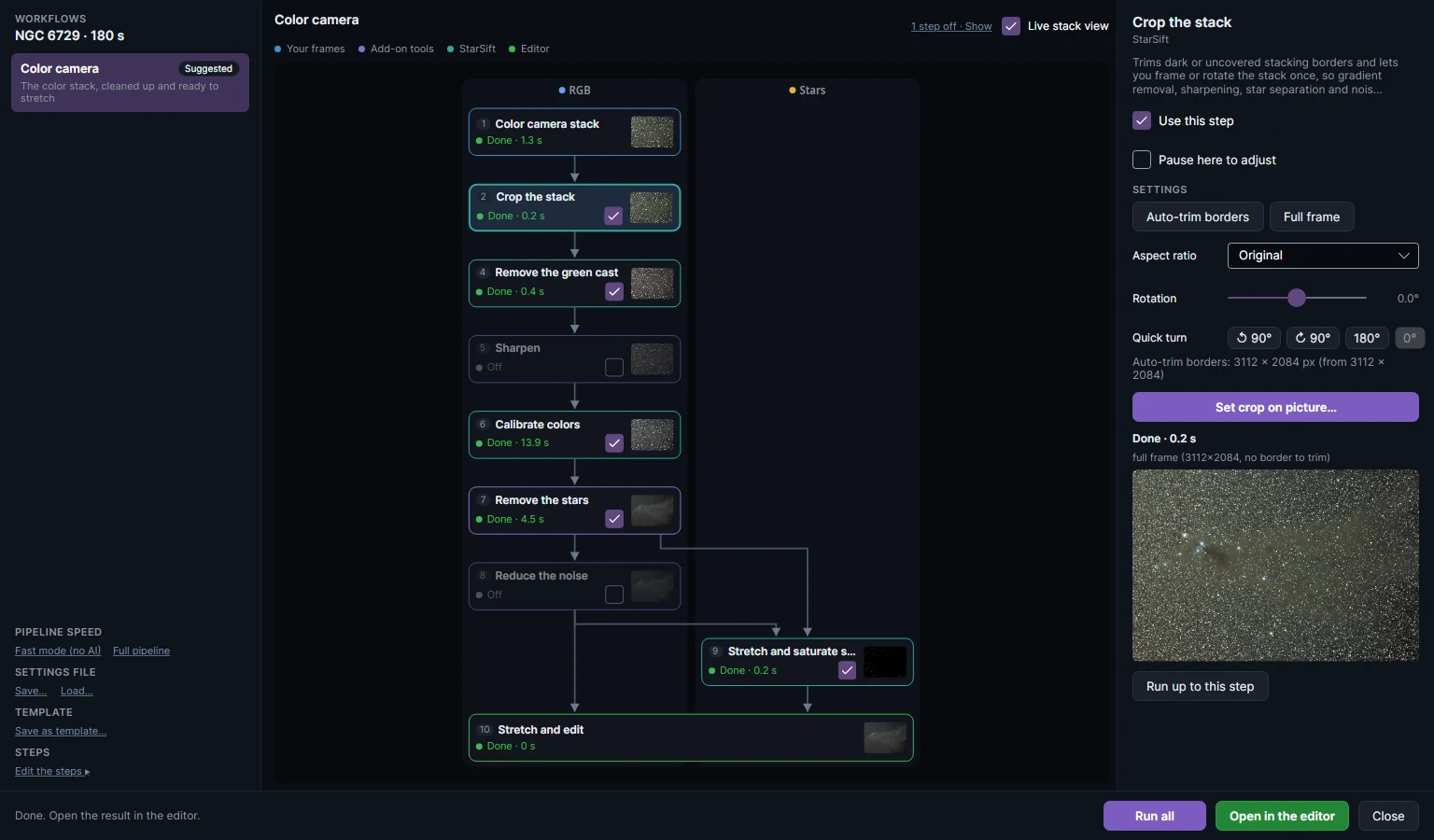
On the left are the workflows that suit the target's filters, the suggested one marked. The workflow is chosen from the filters you have:
| Filters | Workflows offered |
|---|---|
| A color camera | Color camera; with Ha frames, Color camera + Ha; with a dual-band filter, Color camera + Dual-band and HOO or SHO. |
| R, G, B (and L) | RGB or LRGB, and with Ha frames, LRGB + Ha (Ha blended into the red). |
| Ha and OIII (and SII) | HOO or SHO, with the stars of an RGB set or a color camera over them when you have one. |
| Panels of a mosaic | The same pictures as mosaics, every panel stitched per filter. |
In the middle is the diagram: one card per step, in columns for the pictures that flow through it (RGB, Stars, Ha). The legend says where each step comes from: your frames, add-on tools, StarSift, or the editor. Each card shows whether it is done, running or off, and a thumbnail of its result.
On the right is the selected step: what it does, Use this step (for an optional step), Pause here to adjust, its settings, and its result with Run up to this step.
Running it
| Button | What it does |
|---|---|
| Run all | Runs every step that has not run, pausing before the steps set to pause. |
| Run up to this step | Runs the steps before the selected one, then it. |
| Open in the editor | The result as a picture and a stars layer, to stretch and finish. |
| Live stack view | While a stack step runs, shows the stack building up and says in words what each frame did: clear, hazy and counted less, clouded and barely helped. |
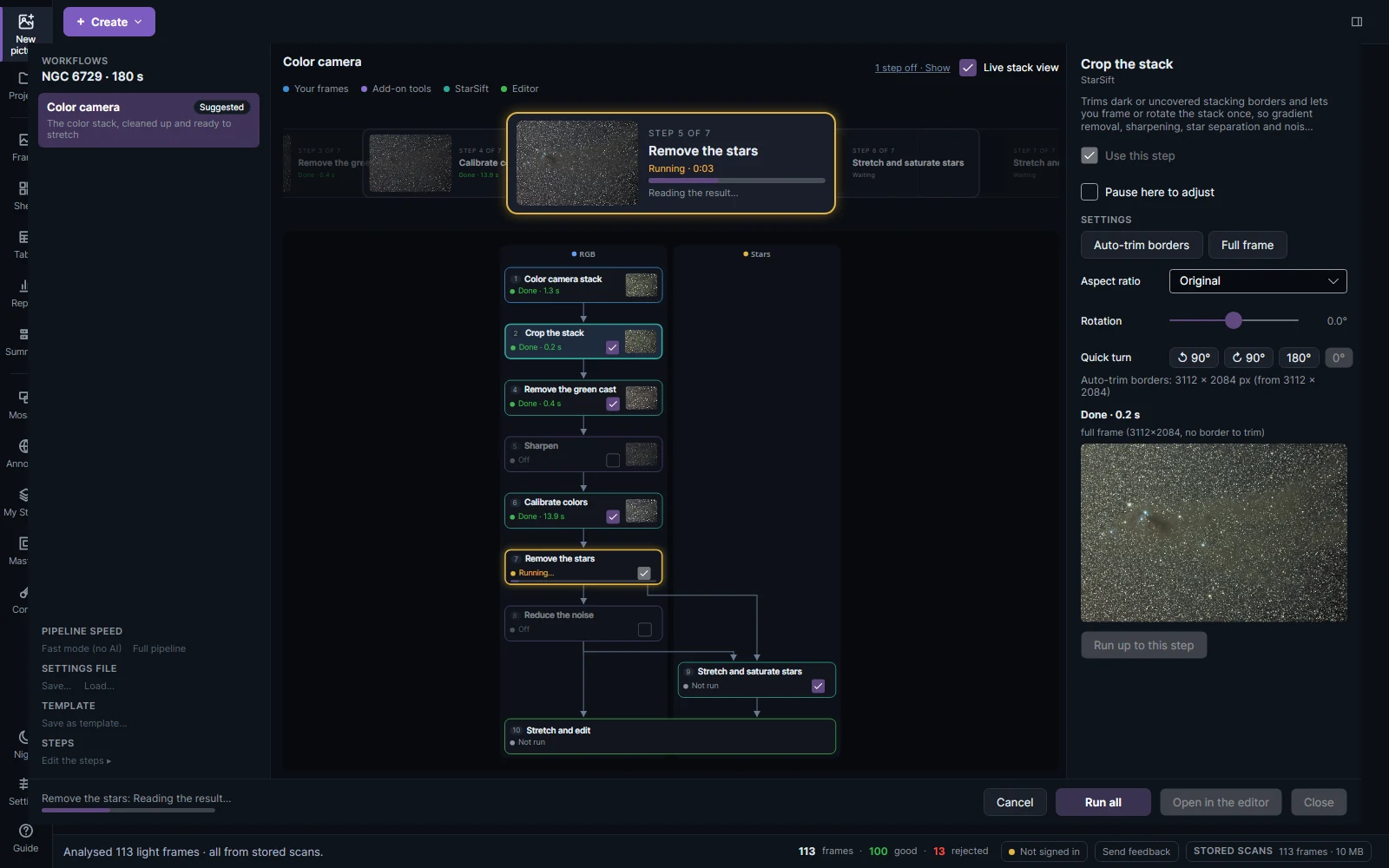
At a pause, the step shows its preview with its settings: drag the crop box, try a blend, compare with Show before. Continue applies the step and goes on; Skip this step leaves an optional step out; Stop here keeps what has run.
A mosaic's Stitch steps (one for each filter) stop once the panels are stitched and open the stitched mosaic in the Mosaic Stitcher: set a panel's brightness, sky, tilt or colour by eye, then Apply to Workflow & Close (or Continue) and the workflow goes on with it. Your adjustments are remembered for the next run. Clear Pause here to fine-tune panels on a Stitch step to run straight through it; New picture never stops.
Steps that run again only when their settings or their input change: change a setting late in the diagram and only the steps after it run again.
Pipeline speed, settings and templates
- Fast mode (no AI) turns off the slow AI steps (sharpening, star removal, denoising); they can still be run in the editor. Full pipeline turns every optional step back on.
- Settings file: Save… and Load… keep a workflow's settings (which steps are on, and each step's settings) in a file, for this target or another.
- Template: Save as template… keeps a workflow you changed as a recipe of your own, offered for every target with the filters it needs.
- Edit the steps adds a step after the selected one (gradient removal, sharpening, noise reduction, green cast removal or color calibration), moves it, renames it or takes it out.
The AI steps use RC-Astro's BlurXTerminator, StarXTerminator and NoiseXTerminator when they are installed and licensed, StarNet2 and DeepSNR as free alternatives, or StarSift's own; see Settings.