 StarSiftaccount
What every part of StarSift does, page by page. New to it? Start with the tutorial, which takes one night from folders to a finished picture.
The way through
StarSift has two ways in. New picture asks for folders and does the rest: it sorts the frames, checks the calibration, measures the frames and runs a workflow, then opens the editor. The rest of the app is there for doing each part yourself: looking through the frames, stacking with your own choices, building a color picture from stacks, stitching a mosaic.
| Page | What it covers |
|---|---|
| New picture | From a folder of frames to a picture, step by step. |
| Frames and screening | Scanning folders, the Viewer, Sheet and Table views, and how frames are judged. |
| Night report and Summary | A night at a glance, tilt and spacing, and moving rejected frames out. |
| Stacking | The stack dialog, the live build-up, and comparing stacks. |
| Calibration masters | Making masters and choosing which nights they calibrate. |
| Workflows | The processing diagrams, their steps and settings. |
| The editor | Layers, the four tabs, history, cropping, saving. |
| How the stretch is chosen | Why a picture opens looking finished, and what the stretch controls do. |
| Create: color, HDR and more | The Create menu: color pictures from stacks, HDR, masters, opening files. |
| Mosaics | Stitching panels into one wide field. |
| Comets | The comet and its stars, stacked apart. |
| Annotate | Naming the objects in any picture from its place on the sky. |
| Projects and My Stacks | Where your pictures and stacks are kept. |
| Settings and account | Preferences, external tools, add-ons and signing in. |
| Command line | Scoring, sorting and stacking from a terminal, and what it cannot do. |
The main window
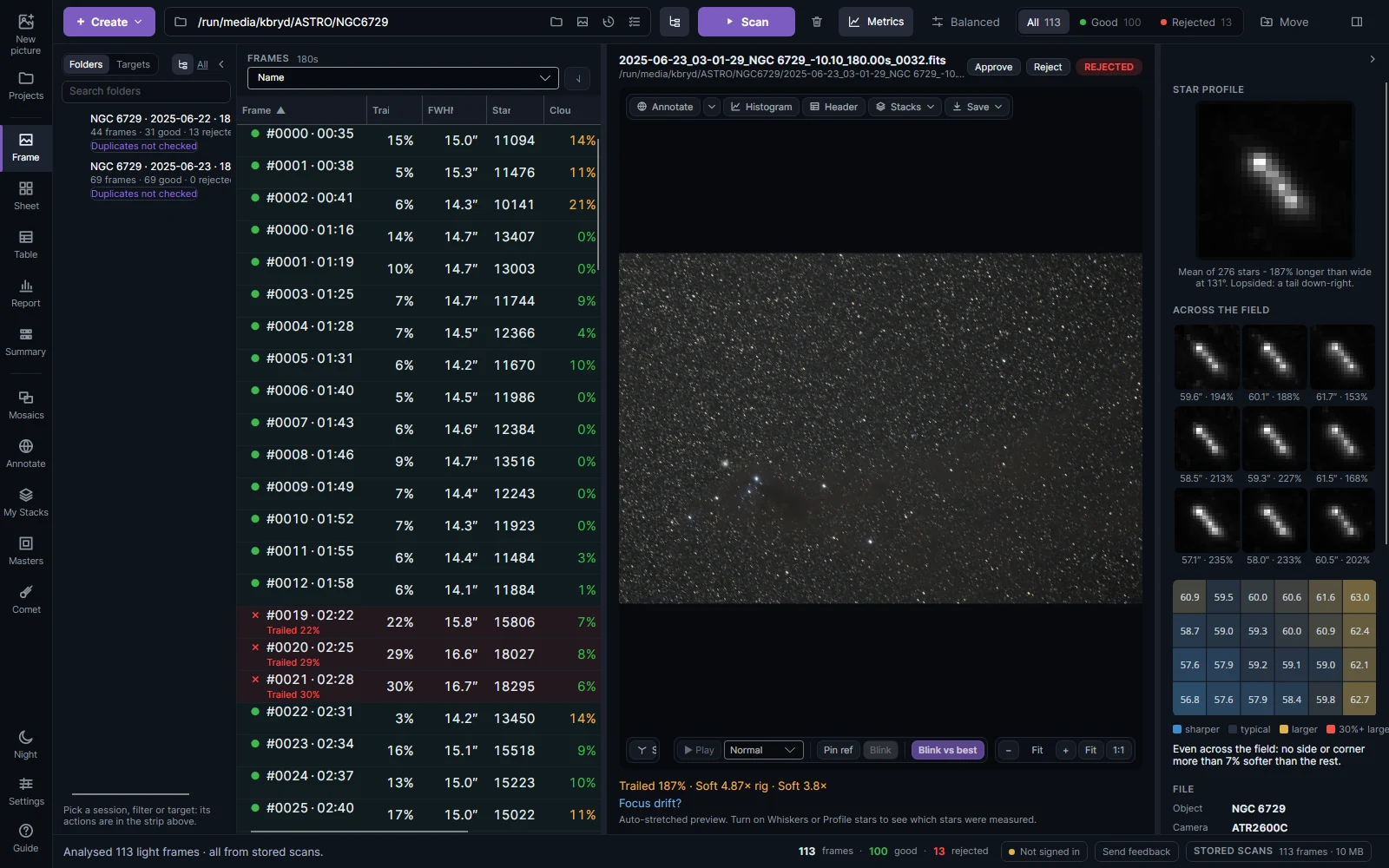
| Area | What it is for |
|---|---|
| Sidebar (left edge) | The views: New picture, Projects, Viewer, Sheet, Table, Report, Summary, Mosaics, Annotate, My Stacks, Masters, Comet; at the bottom Night (red light), Settings and Guide (this manual, F1). |
| Top bar | + Create, the folder box, Scan, Metrics, the screening profile, and All / Good / Rejected. |
| Folders / Targets | The nights scanned, by folder or by target. Right-click one to stack it or open its workflows. |
| Frame list | Every frame with its verdict and measurements. |
| Preview | The selected frame, or a stack. The wheel zooms, dragging moves. |
| Inspector (right) | The selected frame's star profile, its stars across the field, and its measurements. ] folds it away, [ folds the folders. |
Keyboard: Ctrl+1 to Ctrl+9 switch views, Ctrl+O chooses a folder, Ctrl+Enter scans, W / S / Q mark a frame good, rejected or automatic, F1 opens this manual.