 StarSiftaccount
The frame pages are for looking through a night yourself: which frames are good, which are not and why, and what to stack.
Scanning folders
New picture scans for you. To scan a folder yourself, type or paste its path into the folder box in the top bar (several separated by ;), or use the folder button beside it (Ctrl+O). The tree button picks several sessions under one root, and Subfolders includes the folders inside. Recent lists the folders you scanned last.
| Control | What it does |
|---|---|
| Scan | Reads the frames (Ctrl+Enter). It becomes Cancel while it runs; cancelling keeps what was scanned. Right-click it to scan again from scratch. |
| Metrics | On: measures the pixels (stars, FWHM, trailing, cloud) for the checks. Off: reads headers only, much faster, and every frame counts as good. |
| AI | Also scores each frame with a neural network, as a second opinion in the AI column. The verdicts still come from the measured checks. |
| Bin | Clears the results; scans add up until you do. |
Scanned frames are stored, so a folder you open again shows its frames at once, and unchanged frames are not read again.
Viewer
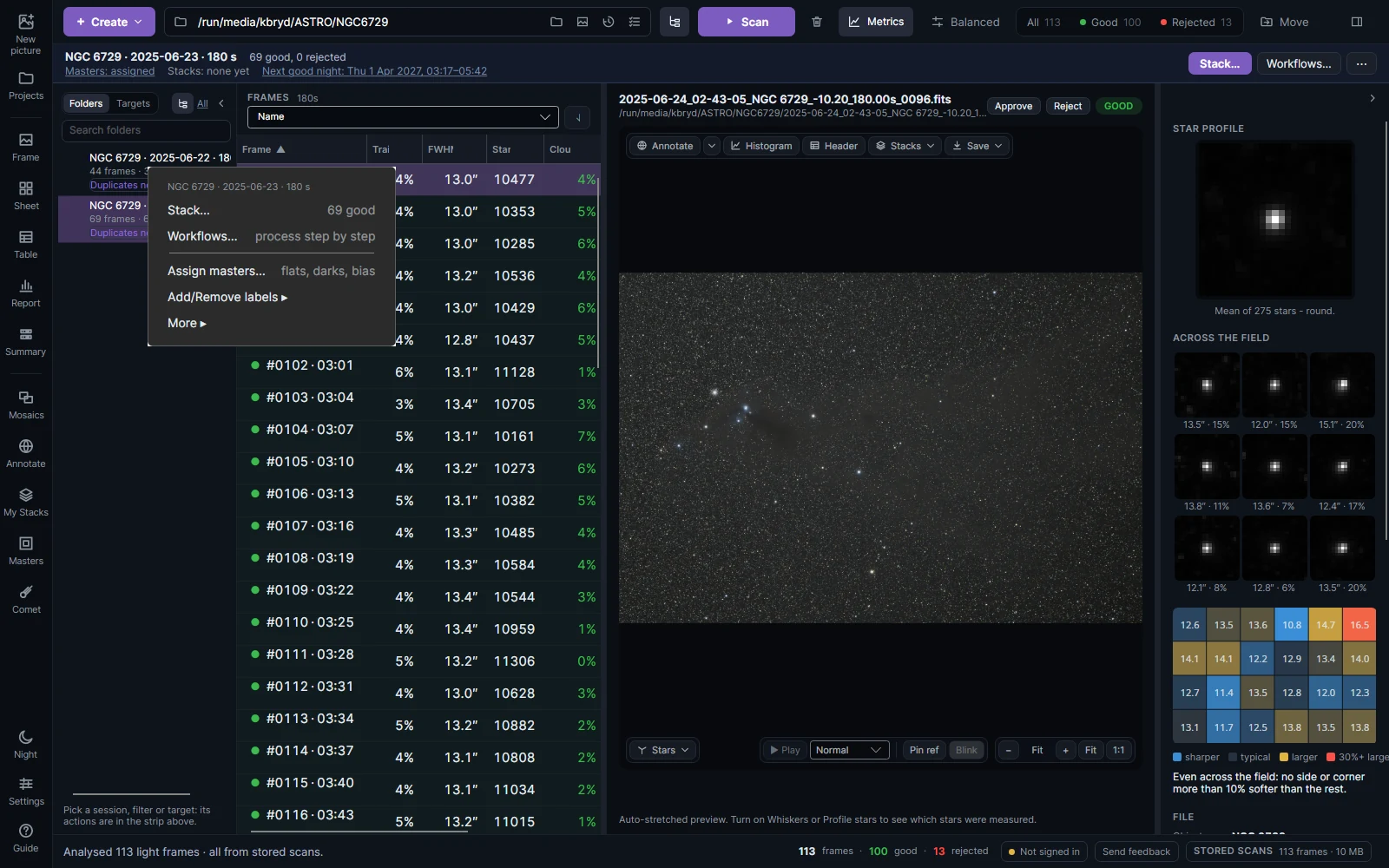
The left column lists the nights, by Folders or by Targets. Click one to show its frames; right-click it for Stack…, Workflows…, Assign masters… and labels. The bar above the frames then shows the night: its counts, the masters assigned, its stacks and the next good night to shoot it.
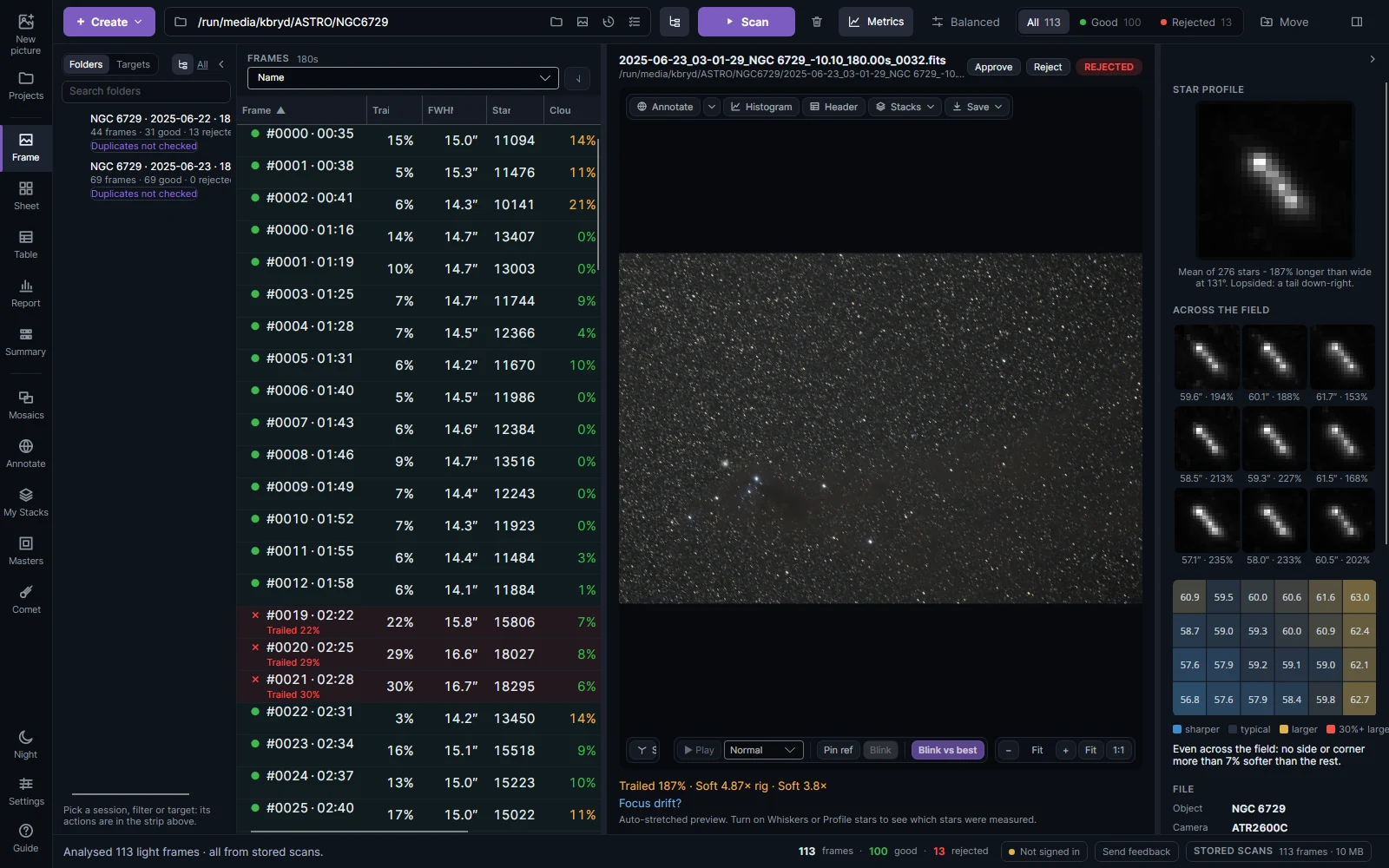
The frame list has a row per frame with its verdict and measurements: trailing, FWHM, stars and cloud. A red cross marks a rejected frame and says why under the row. Sort by any column with the Sort list above it.
Above the picture:
| Control | What it does |
|---|---|
| Approve / Reject | Overrule the checks (W / S). Q goes back to the automatic verdict. A frame you marked shows ✎. |
| Annotate | Name the objects in the frame from its place on the sky. |
| Histogram | The frame's levels, with stretch controls. |
| Header | The FITS header. |
| Stacks | The stacks of this target: click one to show it. |
| Save | Save or copy the picture as shown, or the stack itself. |
Below the picture: Stars marks each star's elongation (green round, red trailed) and rings the stars the checks used; Play runs the frames as a movie (Space) to spot clouds or focus drift; Pin ref and Blink flip between a pinned frame and the selected one; Blink vs best compares with the session's best frame.
The inspector on the right shows the frame's mean star, magnified (round is good, an oval means trailing), the mean star in each ninth of the frame, and the star size across the field as a colored grid. Below them are the measurements and the file's details.
Sheet and Table
Sheet shows every frame side by side, rejected ones outlined in red. Frame shows the whole frame; Detail a small part of each at full size, to see the stars' shape and the noise. Each frame stretches each on its own; Like reference stretches a night's frames alike, so clouds and glow show as brighter frames. Double-click a frame to open it.
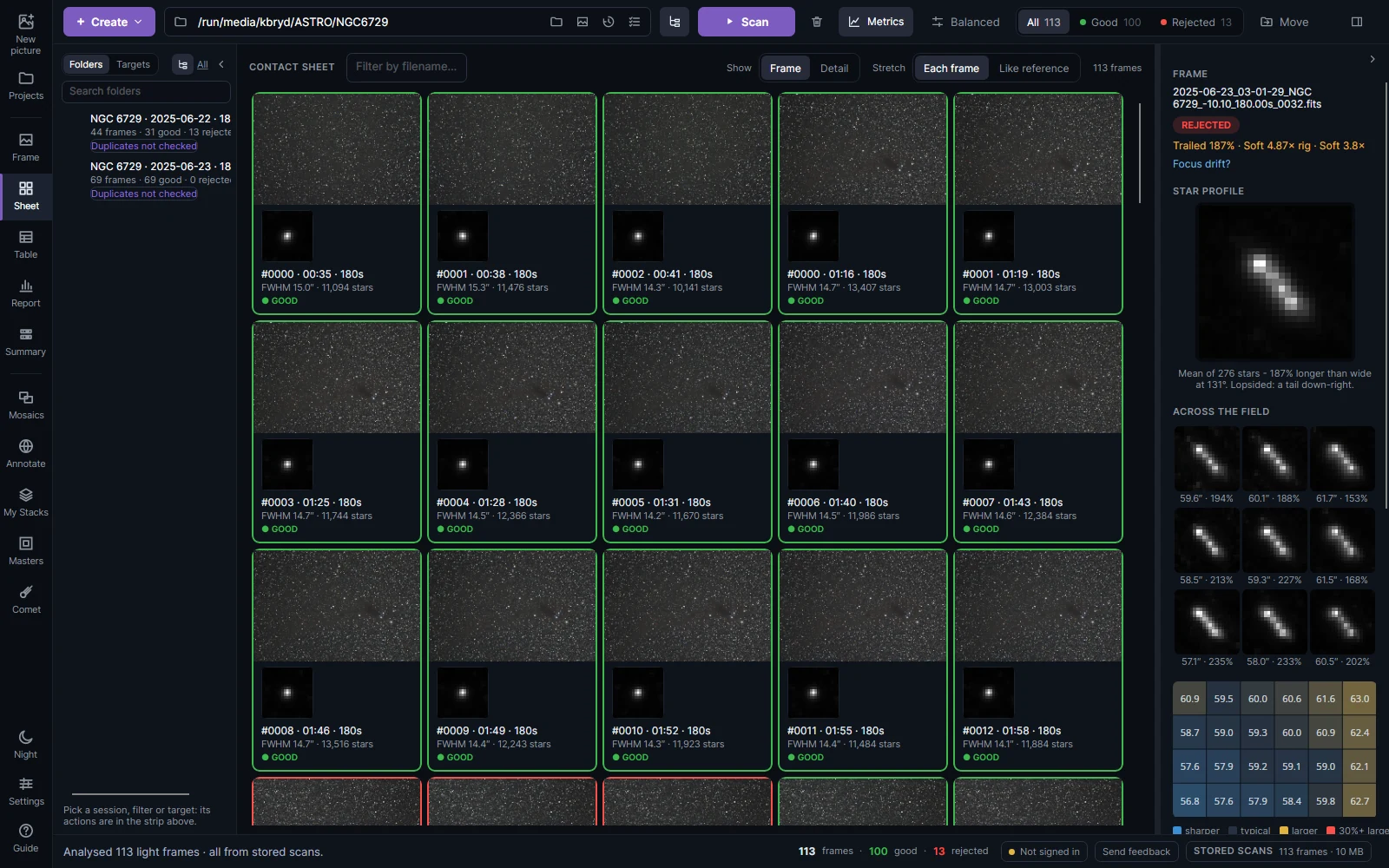
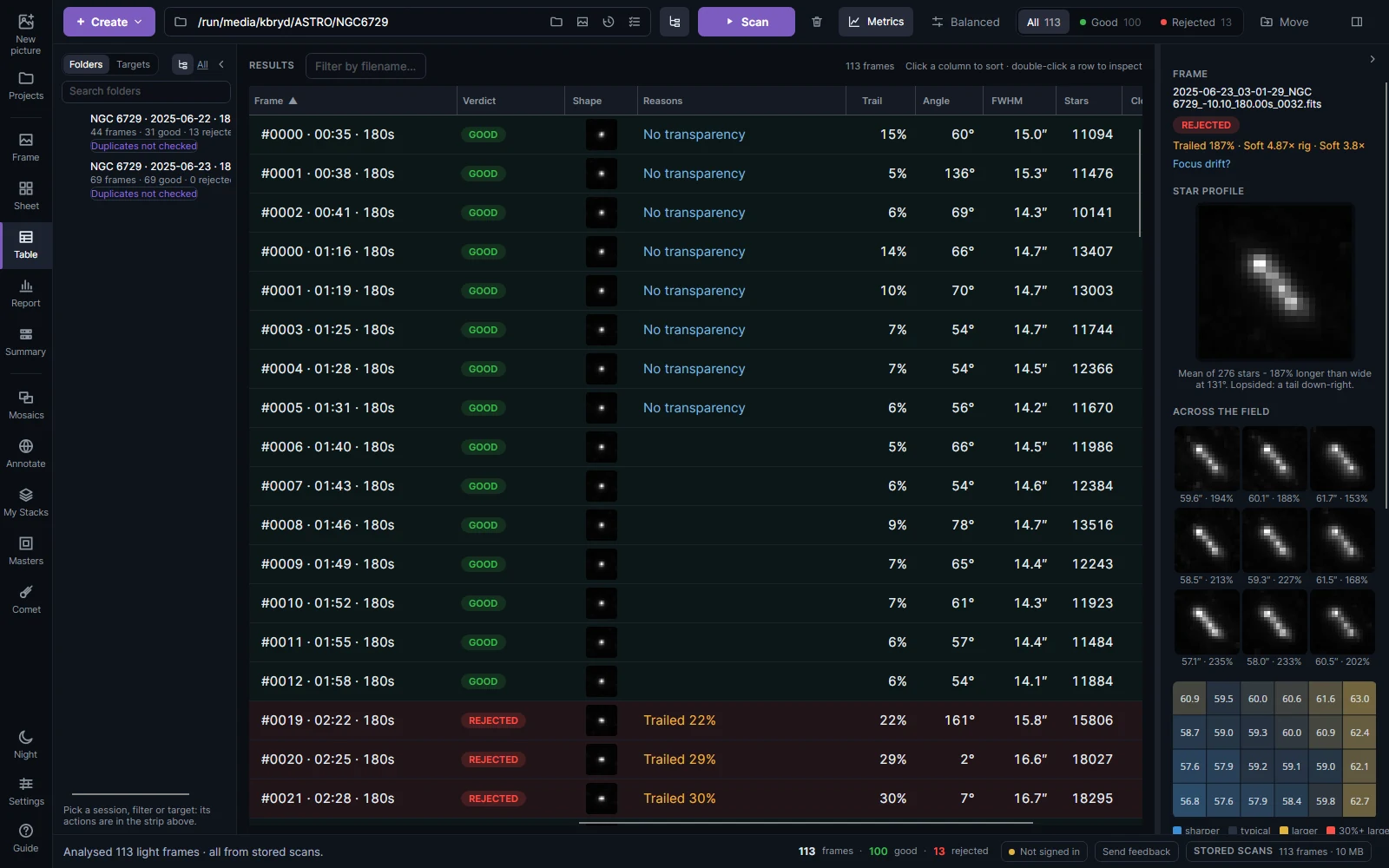
Table has every frame's measurements in columns: click a heading to sort, type in Filter by filename… to find a frame, double-click a row to open it.
Screening: how frames are judged
Click the profile name in the top bar (Balanced) to open Screening. Changes apply at once to every measured frame.
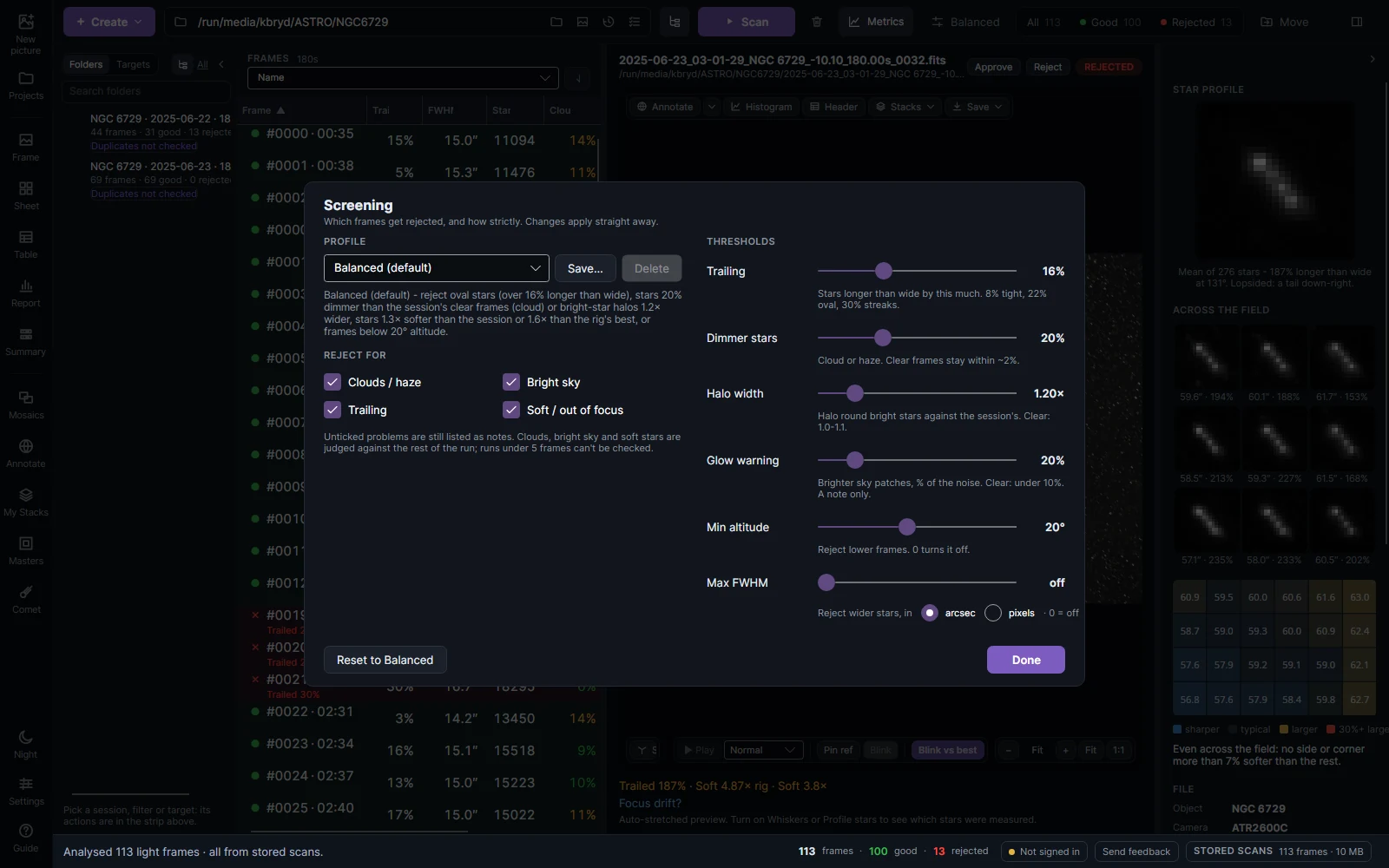
A frame is judged against the rest of its own night, so a bad night is not compared with a good one. Under Reject for, untick a kind of problem to keep it as a note only.
| Check | Rejects a frame when | Balanced |
|---|---|---|
| Trailing | its stars are longer than wide by this much (8% tight, 22% clearly oval, 30% streaks) | 16% |
| Dimmer stars | its stars are this much dimmer than the night's clear frames at the same altitude: cloud or haze | 20% |
| Halo width | bright stars' halos are this many times wider than usual: thin cloud, haze or dew | 1.20× |
| Glow warning | patches of sky sit this far above the usual sky (a note only; cloud is rejected by Dimmer stars) | 20% |
| Min altitude | the target is lower than this (0 turns it off) | 20° |
| Max FWHM | stars are wider than this, in arcseconds or pixels (0 turns it off) | off |
Soft stars are also judged against the night (1.3× softer) and the rig's best in that filter (1.6×). Perfect only is stricter and Permissive keeps more; Save… keeps your own thresholds as a profile. A night of fewer than five frames cannot be compared, so its frames are not rejected for clouds, bright sky or softness.
Moving frames
Move in the top bar moves every rejected frame (or every good one) into a subfolder beside it, or to a folder you choose. Nothing is deleted. The Summary chooses between the unusable and the merely weaker rejects first.